

Live Greenhouse Operations
This is the live-status hub for Verdify. If you want to know what the greenhouse is doing right now, start here.
This page owns current operational state, normal operating policy, and the human-facing operations lane: system health, active relays, data freshness, active plan age, alerts, controller diagnostics, lighting/wetting/irrigation/fertigation rules, and Slack operator briefs. Hardware inventory lives on Equipment Inventory, resource accounting lives on Resource Use, and the planner-writable surface lives on AI Tunables Traceability.
Use this for the continuously refreshed command-center view. The static snapshot below is the crawler-friendly public proof layer.
Most runtime, cycle, controller, and equipment-now panels on this page come from this dashboard.
Plan, alert, firmware-health, and dispatch proof panels remain here.
How to use it
Start with system health. If it is clean, scan equipment-now and controller state to see what the ESP32 is doing. If something looks wrong, use alerts and diagnostics to decide whether the issue is climate, hardware, telemetry, or the active plan. Use the linked canonical pages for policy, hardware facts, and exact tunable names.
System health
Top-line indicators: health score, active alerts, controller uptime, connectivity, memory, controller state, active plan age, and relay state.
Static public API snapshot: 2026-10-02 07:46 MDT. Source: evidence snapshot JSON, home metrics API, and data health API. These values are public receipts for crawlers and locked-down browsers; use the live Operations dashboard above for continuously refreshed state.
Data-health status
Latest climate age
Open critical/high alerts
Active controller mode
Last plan age
Cost today
Relay state is a point-in-time snapshot of physical outputs only; Grafana below shows the full transition history.
Written 2026-10-02 07:01 MDT; age 45m at snapshot time. The ESP32 continues enforcing bounded setpoints while the plan awaits scorecard validation.
Public panic condition is clear at snapshot time; firmware reset and component-health panels below remain the live diagnostic path.
Water accounting status is partial_day; unattributed water remains an instrumentation limitation.
Equipment now
Operations starts with the physical outputs: heaters, fans, vent, fogger, misters, grow lights, and irrigation. This is the fastest way to answer what the controller is currently doing.
What to inspect: which devices are on, when they last changed, and whether the active set matches the expected controller mode.
Protect cold nights and morning recovery. Heat 2 is the high-capacity gas path; heat state should line up with cold stress, controller mode, and thermostat readbacks.
Reject heat and exchange air during ventilation states, but can import dry outdoor air. Check them against controller mode and outside VPD before treating a run as waste.
Respond to VPD pressure and direct-wet permission. Runtime and flow are operational diagnostics here; gallons and cost roll up on Resource Use.
Supplement useful light when lux is low and a circuit is behind its target. Lighting policy details live on Greenhouse Lighting.
Firmware checks schedule, direct-wet windows, and minimum-temperature rules before running clean or fertilized paths.
Use firmware version, reset reason, memory, connectivity, and latest-sample age to decide whether live state is trustworthy.
Runtime boundary
Per-device runtime and cycle panels belong with Equipment Inventory because they describe mechanical burden by relay-backed device. The rollups below stay here because they answer the live operations question: which device families are carrying the greenhouse load now and over the recent operating window?
Thirty-day equipment load
The daily runtime mix shows how the greenhouse work shifts across weather regimes: heat during cold nights, fans and vent during solar load, fog/misters during dry VPD pressure, and grow lights when supplemental DLI matters.
What to inspect: which device family dominates the last 30 days and whether the cost-bearing devices line up with the climate story.
Misters and wetting equipment
Humidity control is an equipment problem as much as a climate problem. The controller has to decide which mist zone to use, whether fog is warranted, and whether flow telemetry matches expected equipment activity.
What to inspect: mister zone runtime, water-flow transitions, and whether totalizer movement matches expected misting or irrigation. For gallons, rates, cost, and seasonal resource proof, use Resource Use.
Controller state
This is where Verdify stops being a dashboard story and becomes a control-system story. The controller table shows state-machine values, transition context, and whether the live firmware state matches the expected equipment behavior.
What to inspect: controller state, mode reason, active mist zone, lead fan, overrides, and recent transitions.
ClimateIntent decision proof
The ClimateIntent controller log is the durable explanation layer for why the firmware chose a mode. It records the selected action, priority axis, signed target deltas, band errors, wet/fog authority decisions, relay truth, and the plan correlation that produced each decision snapshot.
Active plan
The greenhouse follows an explicit plan when the planner is online. The plan record belongs in the generated archive, where the plan id, cycle, rationale, tunables, and later outcome are readable as one document.
Use this for the active plan id, cycle text, tactical changes, and eventual outcome notes.
Use this to understand which planned parameters can affect the ESP32 state machine.
Alerts and diagnostics
When something goes wrong, this is where you verify whether the issue is climate, hardware, controller state, or telemetry.
What to inspect: recent reset reasons, open alert context, and component-level health.
Operating policy
The greenhouse day is governed by lights, climate, wetting windows, irrigation, and fertigation. The policy below describes what the greenhouse is trying to do; the live panels above show whether the controller is actually doing it. The relay-control boundary lives in Safety Architecture.
The greenhouse has a shared activity window behind lighting and direct plant wetting. Current start and duration values live in AI Tunables Traceability.
The main and grow circuits each target daily qualified light minutes. Natural light counts first; lights supplement when lux is low and the circuit is behind its runtime target.
Temperature and VPD bands come from active crop profiles, then the dispatcher derives the whole-house band the ESP32 enforces with heat, fans, venting, misters, and fog.
Misters run only when VPD or zone stress creates demand and only if the zone direct-wet gate is open.
Direct wetting stops before the biological day ends. Center wetting stops earlier than the other wet paths so hanging orchids can dry before night.
Drip and fert paths are scheduled by zone, but they still have to pass the direct-wet gate before water can reach plants.
Wall drip, south/west fert-mister, and center fert paths are separate from VPD-driven climate misting.
The greenhouse can heat, circulate air, and protect safety limits, but automated plant wetting is blocked when the direct-wet gate is closed.
Daily rhythm
The operating day has four practical phases.
Lights may start counting. Climate recovers from night. Direct wetting is still held until each zone wet window opens.
Climate misters and scheduled irrigation can run if there is demand and the direct-wet gate allows it.
Direct wetting is blocked before lights-off so plants are not carried wet into the cooler night.
Lights are off unless policy explicitly changes. Direct plant wetting is blocked. Heat and air movement continue as needed.
Direct-wet windows are permission, not demand. Wall drip, south misters, and west misters open after the shared activity start, then close before activity cutoff for drydown. Center misters and center clean/fert drip paths open later and close earlier so hanging orchids can dry before night. Automated direct wetting also has a minimum-temperature guardrail. If VPD is already fine, misters stay off; if an irrigation cycle is scheduled outside the window, firmware skips it.
Lighting policy
Lighting is controlled as daily useful-light time, not as a fixed on/off timer. The main circuit and grow circuit each have their own qualified-light-minute target, start time, and cutoff. Natural light counts toward the target when it is bright enough. If the greenhouse is dim and a circuit is behind its target, the controller can turn that circuit on; if natural light is strong enough, the circuit stays off or turns off.
The main light policy also defines the greenhouse’s biological activity window. That is why lighting and wetting move together instead of being unrelated schedules. Current values and readbacks live in AI Tunables Traceability; live light behavior lives on Greenhouse Lighting.
Climate, misting, irrigation, and fertigation
The greenhouse has one real air mass but several microclimates. The south end is hotter and drier. East is cooler and more humid. West swings with afternoon sun. Center is a derived/reference zone with hanging orchids. Active crops define target temperature and VPD ranges, the dispatcher derives whole-house setpoints, and the edge controller chooses the equipment posture inside firmware logic and safety rules.
Misters primarily manage VPD. They are allowed only when climate or zone stress asks for moisture, the zone direct-wet window is open, and temperature, water budget, dwell, and safety gates allow it. South, west, and center can be treated differently because each wet path has its own zone context. Fog is separate: it supports room-scale humidity but remains behind its own thresholds and safety checks because it is a high-power wetting tool.
Irrigation is schedule-driven. Wall and center irrigation paths have day masks and start times. Firmware checks the schedule, then checks direct-wet permission before it queues a job. Fertilization is also schedule-driven: clean and fertilized paths are separate relay outputs where installed, fert day masks decide whether a scheduled cycle uses the fertilized path, and zero fert masks fall back to the older every-N-cycle setting. Fert jobs open the fertilizer master valve, run the fertilized zone path, then flush with clean water when that zone has a flush duration.
The stable rule is that fertilizer dose is not tied to how many climate-mist pulses happen on a dry afternoon. Climate misting and fertigation remain separate behaviors.
Slack operator surface
Slack is Verdify’s human-facing operations lane: plans, reminders, climate deviations, checklist items, and links back to dashboards and the public archive. It is an event and explanation channel, not a relay-control surface. Private Slack membership, credentials, and non-greenhouse chatter are not part of the public site.
Posts daily plan summaries, forecast/deviation analysis, and the exact tactical changes it intends to make.
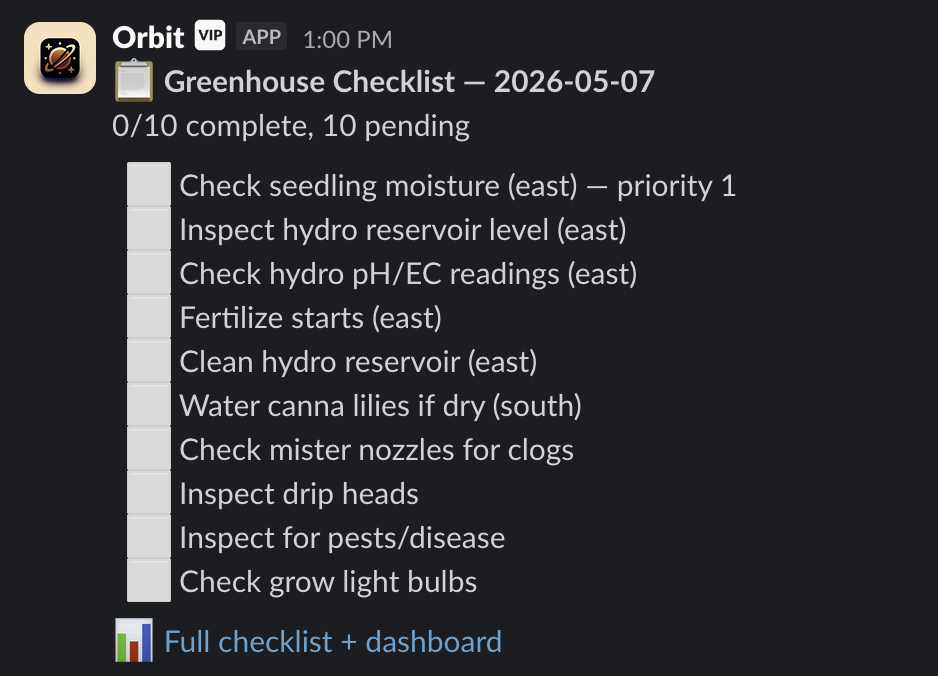
Posts the daily greenhouse task queue: inspection, hydroponics, pest checks, grow-light checks, and maintenance reminders.
Slack is convenient for humans, but the source of truth remains plan_journal, alert_log, daily plan pages, telemetry, and scorecards.
Slack wraps the same planning loop that powers the public archive.
Sunrise, sunset, forecast changes, deviations, or manual checks create a planning trigger.
The trigger reaches the AI planning agent with context, memory, forecast, crop bands, lessons, and audit headers.
The AI planning agent writes a plan with IDs, hypotheses, waypoints, and watch items.
The validated control path acts; Slack only describes what happened.
Slack receives the human-readable summary: what changed, why, what to watch, and what a human should do.
The same cycle lands in the planning archive, scorecards, telemetry dashboards, and lessons.
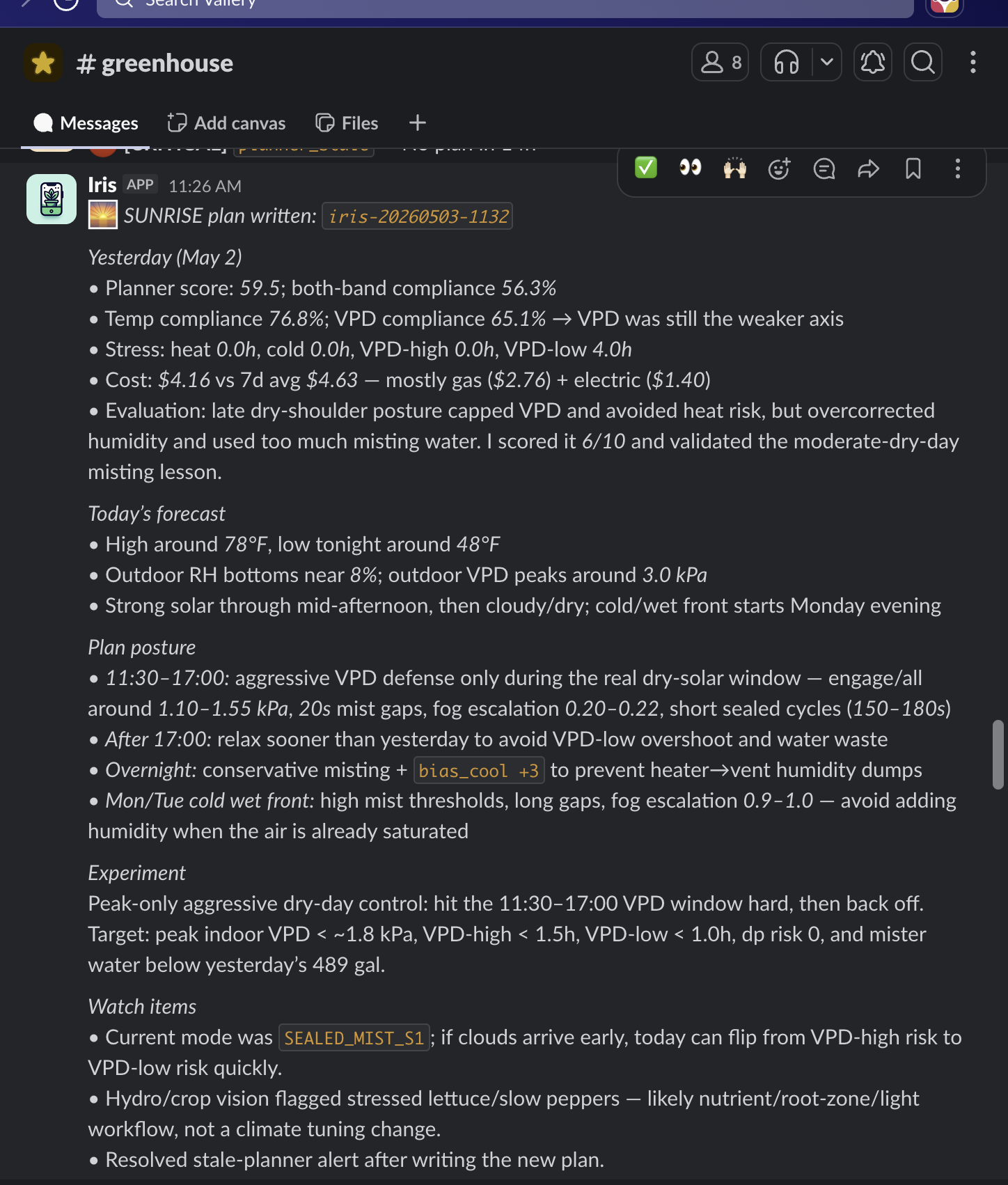
In a successful plan brief, the AI planning agent writes the SUNRISE plan, names the plan ID, summarizes the prior outcome, reads the current forecast, states the plan posture, defines the experiment, and gives watch items for the operator. The public archive keeps the full record; Slack makes the plan understandable when it lands.
The greenhouse has a real maintenance surface: seedlings need moisture checks, hydroponic pH and EC need inspection, reservoirs need cleaning, misters clog, drip heads need inspection, pests show up, and grow lights fail. Orbit posts this as a daily checklist rather than pretending the AI controls every physical task.
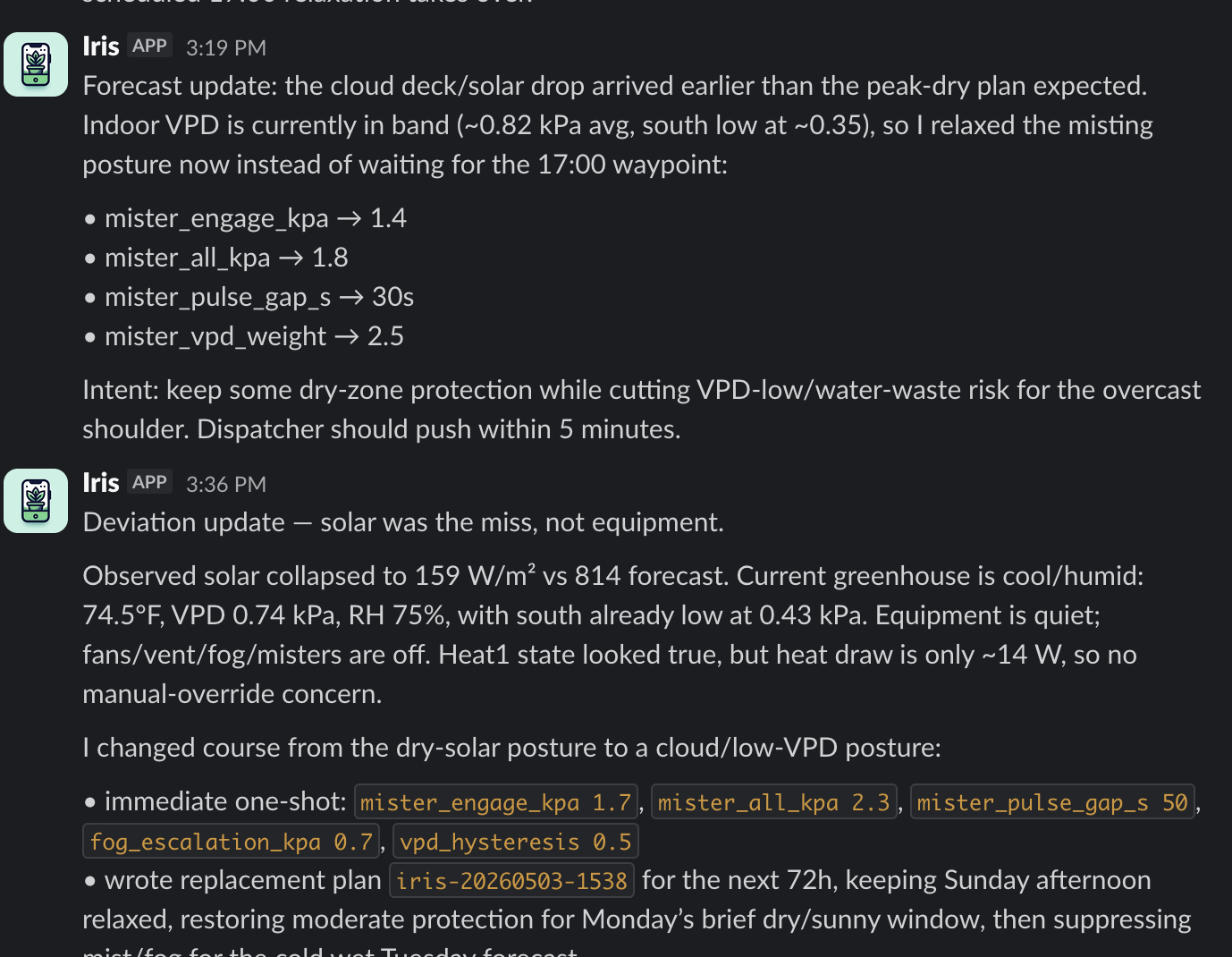
Deviation messages are the operator-assistant layer. When the forecast expected a peak-dry solar window but cloud cover arrived early and solar collapsed, the AI planning agent can explain that the miss was solar forecast error rather than equipment failure, then relax mister and fog posture inside the bounded control surface.
Slack messages are downstream of the event chain. A Slack post can explain a plan, remind a human, or link to evidence; it should not be read as proof that Slack itself approved or executed a physical action.
The AI planning agent posts forecast, prior scorecard, intended posture, expected risks, and plan IDs. The plan still lands through MCP validation, dispatcher checks, and ESP32 enforcement.
The AI planning agent explains the miss and may write immediate bounded tunables. Slack does not flip relays; the ESP32 firmware decides physical state.
Orbit posts hydro checks, pest inspection, reservoir service, grow-light checks, and similar work. A human performs the task and interprets physical conditions.
Sensor issues, stale data, or critical/high alerts can show up in Slack when something needs attention. The canonical record stays in alert_log and public health endpoints.
How this fits the site
This page is the canonical live operational entry point. For:
- resource timing, exact rates, and seasonal cost proof, use Resource Use
- hardware, model names, relay names, runtime panels, and cycle counts, use Equipment Inventory
- temperature, VPD, safe bands, and zone climate behavior, use Climate Control
- historical plan decisions, use Daily Plans
- lessons extracted from incidents and experiments, use Lessons Learned
The operational target is simple: high system health, fast alert response, safe controller behavior, and a greenhouse that follows the plan closely enough for the lessons to mean something.